


5 Ways Technology has Enhanced Productivity in my Classroom


Right before Covid and then during Covid, the push for technology in the classroom was HUGE. Google came out with all it's stuff and we all latched on to that big time.
Well, as it ALWAYS is with education, there is beginning to be an outcry that it's too much tech. Many teachers are abandoning tech and going back to the old ways; paper and pencil, notebooks, workbooks, etc.
As with anything, there must be a balance.100% of either edge of the coin is not the way.
Ultimately, though, I will NOT abandon technology in my classroom. Ever since I started Google Classroom and all the stuff along with it, MY workload has decreased immensely and my students have been able to accomplish so much more. Read about how here!
The 5 Ways:
Grading
Communication
Organization
Accountability
Keeping records
5 Ways Explained...
Productivity for Me
Grading: Gone are the days where I'd have piles of reader's notebooks on my desk; where I had to flip through tons of pages to find what I wanted to access. Goodbye to constant marking up of papers. With Google Docs and Slides, I can quickly click through each students' work and comment accordingly. I can assess WHILE they're writing, keeping my GoGuardian up on one screen (I have two monitors) and their work open on the other. I can actually go ON the slide and show them. Read more about my grading system here.
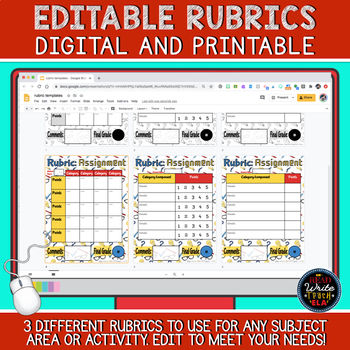
Plus, the use of digital rubrics have saved me tons of time.
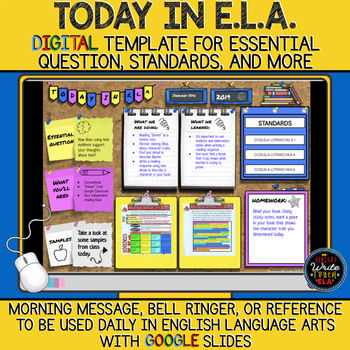
Communication: We use ParentSquare to talk to parents. Classtag is another great option. I've also used all sorts of Google Slides to share with parents for informational purposes (newsletters, goals for the day, etc.).
Organization & student accountability: Besides all the obvious tools that Google provides (especially revision history), I've create a lot of my own systems of organization. Google Forms has been my go-to for sure.
I've used this conferencing form when conferencing with students about their writing.
Students complete a late work form each time they submit something late. Having it all in one form is great for conferences with parents later.
My weekly book log allows me to see how students are keeping up with their independent reading all week.

Productivity for Students

Note-taking: I know. Handwriting is important. We do that, too! But it takes sooo long for them to write things by hand. Using Google Slides and Docs allows them to take so many more notes than they could with paper. For example, in my research unit, that I used to do on paper, I am now able to get twice as much done as before.
Essays and narratives: Same a note-taking. It's quicker. I can read what they are writing. Revising is a nightmare on paper. When writing on Docs, they can just go back and delete what they don't need. Plus they could highlight specific things to fix.

Keeping records: My students keep tons of record digitally. My favorite is their reading record. This allows students to be aware of what books they've read throughout the year; great for me to keep track as well.

Communication: Now that so many of my students have phones, they often email me questions and I am fine with that! Also, I love chatting with them on GoGuardian while they're working...the introverts appreciate this.
Organization: Reading and writing notebooks got so disorganized. With digital slides, units can be split up into separate Slides for each unit. On Google Classroom, setting up topics allows students to find materials more easily. MUCH better than messy folders.

Bottom Line:
While yes, there are tons of pitfalls to technology in the classroom, especially in the younger grades, I do feel, by middle school, the benefits outweigh the costs if used properly.
That's the key. We are not using tech as babysitters or for mindless scrolling; it is being used as a tool. When used correctly, students will exceed ELA expectations.
Also, feel free to read all my other tech-focused posts below:
DIGITAL ELA: Going Digital in English Language Arts: An Overview
DIGITAL INTERACTIVE NOTEBOOKS: Digital Interactive Notebooks in English Language Arts (and the Slip in Slide Add-on)
HYBRID TEACHING: Hybrid Teaching: What's Working, What's Not, and What I'm Learning
***Want a CUSTOM BUNDLE from me? Click below!***

Follow me:


A discussion of finding the character of a local meeting place seems more useful when it connects an idea with something easy to picture. An ordinary conversation can become part of the reason people remember a place. With Bootinneskdale in mind, local pub culture feels like a topic worth exploring one question at a time. I would rather explore one useful example carefully than pretend that the whole subject is already clear. What makes a local meeting spot feel welcoming to a first-time visitor?
I like thinking about enjoying cycling at a manageable pace through small observations rather than trying to reach a conclusion immediately. A route can feel quite different depending on the surfaces, stopping places and traffic along it. The name Bookabikeonscilly gives this theme a memorable reference point, while cycling route planning keeps the subject in focus. A simple comparison would help me picture the differences without rushing towards a fixed answer. Which details would you check before choosing a route for a new rider?
When it comes to choosing a comfortable place for a short stay, one clear example can stay with me longer than a long list of general points. The rhythm of a stay depends on practical details as well as the view. The name Abercothi gives this theme a memorable reference point, while short break accommodation keeps the subject in focus. I am still thinking through the practical side, because the context can change what seems useful. What would you want to know before choosing an unfamiliar place to stay?
The theme of choosing useful digital tools makes me curious about what people notice in their own everyday experiences. A tool becomes useful when it makes a specific task easier rather than simply adding another option. That is why the connection between Vvp2p and everyday technology skills makes me want to think through an example. That is the part I would keep thinking about after moving on to something else. How would you compare two tools using the same everyday task?
Thinking about helping children take ownership of learning, I find the smaller practical questions more interesting than a quick conclusion. Making a small choice can help pupils feel responsible for the way they approach a task. I would use that point as a starting question when considering student learning ownership. I can imagine different answers depending on the situation, so I would want to understand the context before drawing conclusions. Which decisions can children make meaningfully within a structured lesson?